Breaking: UP Board Result 2026 Date Officially Announced
The wait is almost over.
Uttar Pradesh Madhyamik Shiksha Parishad (UPMSP) is set to announce the UP Board Result 2026 for Class 10 and Class 12 on April 23, 2026 at 4:00 PM. Once declared, students will be able to check their scorecards on the official websites — upmsp.edu.in and upresults.nic.in.
This is one of the most-watched results in India. Over 53.37 lakh students registered for these board exams — 27.61 lakh in Class 10 (High School) and 25.76 lakh in Class 12 (Intermediate). If you’re among them, here is everything you need to know right now.
Key Details at a Glance
Detail
Information
Board Name
Uttar Pradesh Madhyamik Shiksha Parishad (UPMSP)
Result Date
April 23, 2026
Result Time
4:00 PM (expected)
Classes
Class 10 (High School) & Class 12 (Intermediate)
Total Students
53.37 lakh+
Official Website
upmsp.edu.in, upresults.nic.in
Alternate Platforms
DigiLocker, UMANG App
Passing Marks
33% in each subject and overall
Compartment Exam
July 2026
Who Can Check the Result? Eligibility & Requirements
Any student who appeared in the UP Board High School or Intermediate Annual Examination 2026 is eligible to check their result.
What you will need:
Roll Number — printed on your UP Board Admit Card 2026
School Code — required for Class 12 students (also on admit card)
A working internet connection OR a mobile phone for SMS
Access to the official websites or DigiLocker app
Pro Tip: Keep a printed or photographed copy of your admit card handy. Your roll number is the single most important piece of information you’ll need on result day.
Exam Dates (for reference):
Class 10 exams were held from February 18 to March 12, 2026
Class 12 exams were held from February 18 to March 24, 2026
Exams were conducted across 8,033 centres across Uttar Pradesh
How to Check UP Board Result 2026 Online — Step-by-Step
The official result portals can get extremely slow on result day due to millions of simultaneous visitors. Here’s the exact process, plus smart workarounds.
Official Websites:
upmsp.edu.in
upresults.nic.in
results.upmsp.edu.in
Steps to Check Your Result:
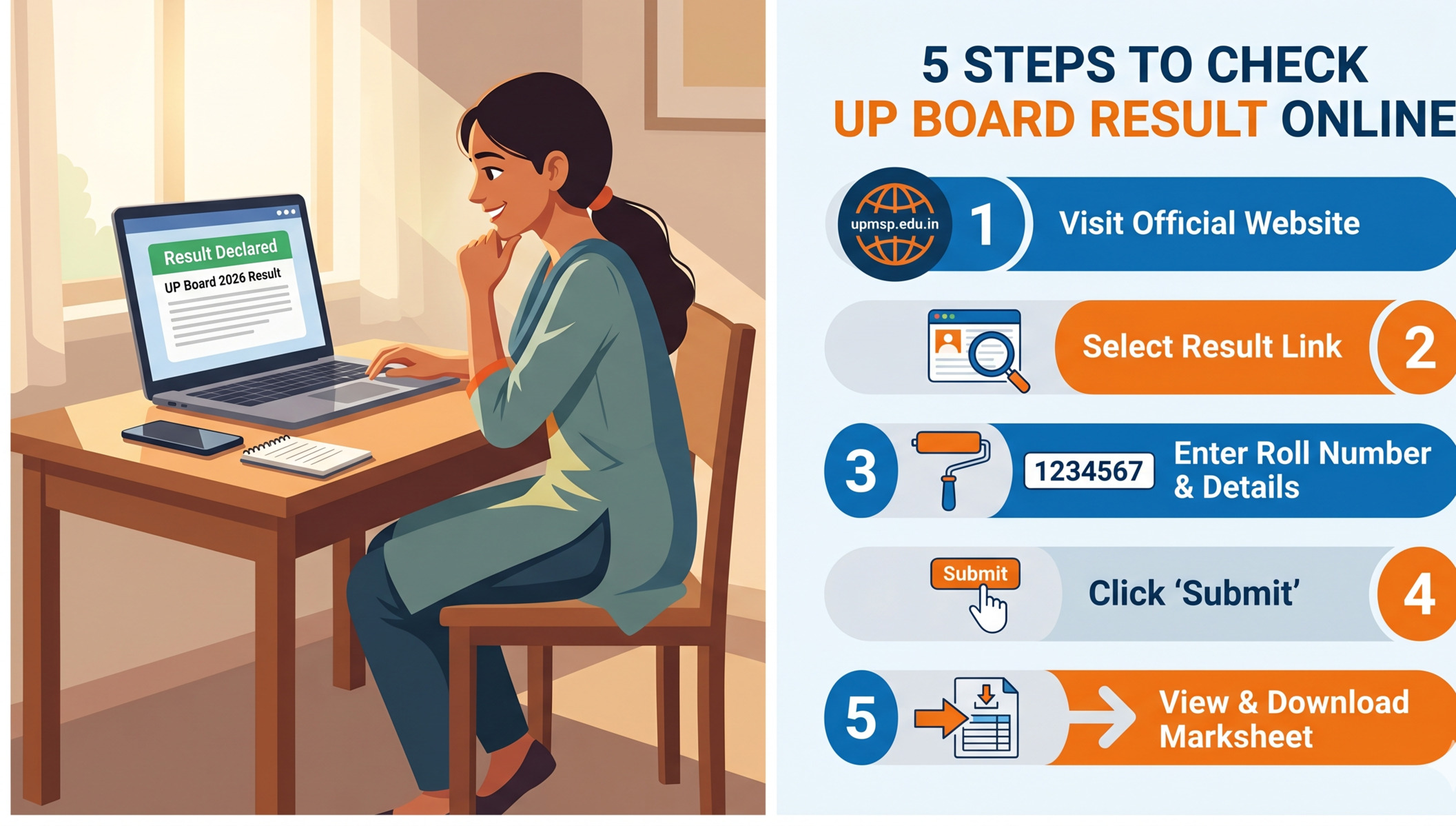
Open your browser and visit upmsp.edu.in or upresults.nic.in
On the homepage, look for the link “UP Board High School Result 2026” or “UP Board Intermediate Result 2026”
Click on the relevant link for your class
Enter your Roll Number (and School Code for Class 12)
Click the Submit button
Your result scorecard will appear on screen
Download the PDF or take a screenshot for future use
If the site is slow or down: Try refreshing after a few minutes, or switch immediately to the DigiLocker or SMS method (explained below). Official websites routinely experience traffic surges on result day — don’t panic.
How to Download via DigiLocker & UMANG App
DigiLocker is the government’s official digital document platform. Your UP Board marksheet on DigiLocker is legally valid — the same as a physical copy for most purposes.
Steps for DigiLocker:
Open the DigiLocker app (or visit digilocker.gov.in)
Sign in with your Aadhaar-linked mobile number or create an account
Go to “Search Documents”
Search for “UP Board” or “UPMSP”
Enter your roll number and date of birth
Your marksheet will appear — tap to download
For UMANG App:
Download and open the UMANG app
Search for “UP Board Result”
Enter required details and download your result
DigiLocker is particularly recommended because it keeps your marksheet permanently accessible and eliminates the risk of losing physical documents.
Check Result via SMS — The Fastest Method
Even if the internet is slow or your data gives out, you can still get your result almost instantly via SMS.
For Class 10: Type: UP10 <space> Roll Number Send to: 56263For Class 12: Type: UP12 <space> Roll Number Send to: 56263
Example: If your roll number is 12345678, send UP10 12345678 to 56263.
You’ll receive your result as a text message within minutes.
Passing Marks & Grading System Explained
To pass the UP Board exam 2026, students must secure:
A minimum of 33% marks in each individual subject
A minimum of 33% overall aggregate
Both conditions must be met. Scoring well in some subjects but failing in even one can result in a “Compartment” status.
Understanding Your Marksheet:
Your marksheet will show subject-wise marks, total marks, and percentage
Grades or divisions (First, Second, Third Division) are based on overall percentage
The topper list for both Class 10 and Class 12 will be published alongside the results
Important Dates Summary
Event
Date
Class 10 Exams
February 18 – March 12, 2026
Class 12 Exams
February 18 – March 24, 2026
Answer Sheet Evaluation Completed
April 4, 2026
Result Declaration
April 23, 2026 (4:00 PM)
Compartment Exam Registration
May/June 2026
Compartment Examination
July 2026
Compartment Result
August 2026
Conclusion
The UP Board Result 2026 is moments away, and with over 53 lakh students waiting, it is shaping up to be one of the biggest result declarations of the year. Whether you’re a student checking your own scorecard or a parent helping your child navigate this moment — preparation is key.
Bookmark upmsp.edu.in and upresults.nic.in, keep your roll number ready, and consider using the SMS method or DigiLocker as a backup when websites are under heavy load. Whatever the result, remember: it is one step in a long journey. Options like compartment exams, scrutiny, and re-evaluation ensure that no one is left without a path forward.

If you dream of becoming a college professor or earning a Junior Research Fellowship, the NTA UGC NET June 2026 exam is your single most important step. The National Testing Agency (NTA) officially released the notification on April 29, 2026, and the online application window is already open. But here’s the catch — the last date to apply is May 20, 2026, and missed deadlines mean waiting another six months.
This guide gives you every detail you need: important dates, eligibility, how to fill the form, the application fee, preparation tips, and common mistakes to avoid — all in one place.
What is UGC NET and why does it matter?
The University Grants Commission National Eligibility Test (UGC NET) is a national-level exam conducted by the NTA on behalf of the UGC. It determines the eligibility of Indian nationals for three key purposes:
Junior Research Fellowship (JRF) — a monthly stipend to pursue PhD research at top universities
Appointment as Assistant Professor in central and state universities
Admission to PhD programs across India without any additional entrance test at many institutions
Qualifying UGC NET is widely regarded as one of the most respected academic credentials in India. It validates your subject expertise at a national level and opens doors across academia, research labs, and government-funded institutions.
New in 2026: NTA has added two new subjects — Statistics and Forestry — bringing the total to 87 subjects for the June 2026 session.
Important dates at a glance
Missing a date can cost you six months. Bookmark this table and set reminders today.
Event
Date
Notification released
April 29, 2026
Online application opens
April 29, 2026
Last date to apply online
May 20, 2026 (11:50 PM)
Last date for fee payment
May 20, 2026 (11:50 PM)
Application correction window
May 22 – May 24, 2026
Exam city intimation slip
By June 10, 2026
Admit card release
By June 15, 2026
Exam dates
June 22 – June 30, 2026
Provisional answer key
Within 10–15 days after exam
Result declaration
Expected last week of July 2026
Correction window is your only safety net. From May 22–24, you can fix errors in your form — but wrong images, signatures, or ID uploads cannot be corrected after submission per the official notification. Fill your form carefully the first time.
Eligibility criteria
Educational qualification
A Master’s degree (or equivalent) in a relevant subject from a UGC-recognised university with a minimum of 55% marks
Candidates in the final year of their Master’s are also eligible to apply
Candidates with a 4-year / 8-semester Bachelor’s degree with at least 75% marks are eligible for JRF and PhD admission (but not for Assistant Professor appointment)
SC, ST, OBC (non-creamy layer), PwD, EWS and other reserved categories get a relaxation of 5% marks
Age limit
Category
Age limit
Relaxation
JRF
Maximum 30 years (as on June 1, 2026)
5 years for OBC-NCL, SC, ST, PwD, Third Gender, Women
Assistant Professor
No upper age limit
—
PhD admission only
No upper age limit
—
If you are above 30 and applying only for Assistant Professor eligibility or PhD admission, there is no age bar. Only JRF applicants are subject to the age limit.
Application fee details
Fees must be paid online before the May 20, 2026 deadline. No offline payment mode is available.
General / Unreserved
₹1,150
OBC (Non-Creamy Layer)
₹600
SC / ST / PwD / Third Gender
₹325
EWS
₹600
Payment accepted via: Debit card, credit card, net banking, or UPI.
How to apply online
The entire process is online at ugcnet.nta.nic.in. Here is how it works:
1
Visit the official websiteGo to ugcnet.nta.nic.in and click on the “UGC NET June 2026 Registration” link on the homepage.
2
New registrationEnter your name, date of birth, mobile number, and email ID — or log in using MeriPehchaan (Aadhaar, PAN, or DigiLocker). You will receive an application number.
3
Fill the application formLog in with your application number and password. Enter personal details, educational qualifications, category, preferred exam subject, and preferred exam city choices.
4
Upload documentsUpload a recent scanned photograph, signature, and PwD certificate (if applicable) in the prescribed format and dimensions.
5
Pay the application feeComplete fee payment via your preferred online mode. Save the payment confirmation receipt.
6
Download and save the confirmationTake a printout or screenshot of the final submitted application form with your application number for future reference.
Important: Submit only one application. Multiple applications from the same candidate will be rejected without any refund of fee.
Documents required for the application
Valid email ID and mobile number (your own or a parent’s/guardian’s)
Aadhaar card, PAN card, or DigiLocker login details for MeriPehchaan
Exam pattern & subjects
How the exam is structured
Paper
Questions
Marks
Duration
Paper 1 (Teaching & Research Aptitude)
50 MCQs
100
Conducted in one continuous session
Paper 2 (Subject-specific)
100 MCQs
200
Total: 3 hours
Marking scheme: +2 marks for each correct answer; no negative marking
Mode: Computer Based Test (CBT) at centres across India
Total subjects in June 2026: 87 (including newly added Statistics and Forestry)
Qualifying marks: 40% aggregate for General; 35% for reserved categories
Preparation tips that actually work
Start with a plan
Create a 30-day timetable, splitting time between Paper 1 and your chosen Paper 2 subject. Allocate more hours to weaker areas.
Master Paper 1 first
Paper 1 is common for all candidates and covers logical reasoning, teaching aptitude, data interpretation, and research methodology. Strong Paper 1 scores can make the difference.
Solve previous papers
Practising question papers from the last 5–6 years builds pattern recognition and reveals high-frequency topics faster than reading alone.
Time yourself
Take full-length mock tests under timed conditions. You have 3 hours for 150 questions — roughly 72 seconds per question. Practice makes this feel natural.
Focus on the updated syllabus
NTA revised subject codes and syllabi for June 2026. Always download the official notification PDF and match your study material to the current syllabus.
Revise consistently
Spaced repetition beats cramming. Review notes every few days rather than once before the exam. Short, daily revision sessions are more effective.
Common mistakes to avoid
Uploading wrong documents: An incorrect photo, signature, or ID proof cannot be corrected after submission — the NTA notification makes this explicitly clear.
Waiting until the last day: Server congestion on May 20 can cause technical issues. Apply at least 3–4 days before the deadline.
Selecting the wrong subject code: With 87 subjects now available, double-check your chosen subject and its code in the official notification before submitting.
Submitting multiple forms: Only one application per candidate is accepted. Multiple submissions lead to rejection, not selection.
Ignoring Paper 1: Many candidates over-focus on their subject paper and underestimate Paper 1. Both papers contribute to the final aggregate score.
Not saving the application number: Your application number is essential for admit card downloads and future logins. Store it securely.
Key takeaways
UGC NET June 2026 notification released April 29; application closes May 20, 2026 at 11:50 PM
Exam will be held June 22–30, 2026 in CBT mode for 87 subjects
JRF age limit: 30 years; no age limit for Assistant Professor or PhD admission route
Master’s degree with 55% marks is the basic qualification (5% relaxation for reserved categories)
Correction window available May 22–24 — but photo/signature errors cannot be fixed after submission
No negative marking — attempt all questions confidently
Conclusion
The UGC NET June 2026 exam is a defining opportunity for anyone serious about a career in Indian academia or research. With the application window already open and just days left until the May 20 deadline, there is no time to wait. Fill your form carefully, keep your documents ready, and start your preparation now. The exam rewards consistent study and smart practice — not last-minute panic.
Visit ugcnet.nta.nic.in to apply directly and download the official notification PDF for the most accurate and current information.